

Canvas Blog: Protecting student identity in Canvas - BioSig-ID™️ for FSA fraud, cheating, and proctoring
- Jan 15
- 6 min read

"Online education has opened doors for learners everywhere—anytime, anywhere, on any topic. But with this growth comes new security Risks for institutions at every stage of the student journey:
At the start (Enrollment period): Identity thieves exploit enrollment systems and create Bots and fake IDs to steal Federal Student Aid (FSA) funds.
In the middle (During course): Students share login credentials, enlist friends and family, or hire contract cheaters to complete coursework.
At the end (End-of-course): High-stakes exams face growing threats from contract cheaters and AI-assisted cheating.
The stakes are high: billions in taxpayer dollars are lost annually to fraud, while universities struggle to maintain identity verification throughout the entire course. For institutions laser-focused on strengthening and automating security practices, BioSig-ID solves this challenge by integrating seamlessly with Canvas LMS’ courses and learning tools to deliver continuous identity verification—from enrollment to final exams. This helps institutions prevent fraud, stop cheating, and ensure every credential reflects genuine achievement by the registered student.
Example Image: Example of a BioSig-ID password

The Start - Preventing FSA Fraud During Enrollment Periods
Federal Student Aid fraud often goes unchecked in online programs, with fraud rings creating synthetic identities or stealing real identities to enroll, claim Title IV aid, and disappear after disbursement—sometimes submitting AI-generated coursework to appear engaged. The U.S. Department of Education reports billions in improper payments annually, much of it tied to identity fraud schemes. Traditional safeguards like Manual ID checks, typed passwords, and MFA codes are no match for today’s advanced tactics—bots using stolen or fake identities can bypass these security measures with ease. Recent federal initiatives now require stronger identity verification for aid applicants, making compliance and security essential.
The Solution: Identity Verification with BioProof-ID
Enrollment fraud using fake IDs is a major driver of FSA misuse. BioProof-ID stops it by verifying government-issued IDs and comparing them against government records using real-time selfies, ensuring that the person applying for aid and enrolling in courses is legitimate. At the same time, students create their BioSig-ID gesture-based biometric password, linking their verified identity to all future course access and preventing bots from enrolling with a written password. This dual-layer approach closes the door on fraud rings before classes even begin.
Example Image: BioProof-ID FSA email

Example Image: BioProof-ID user submission
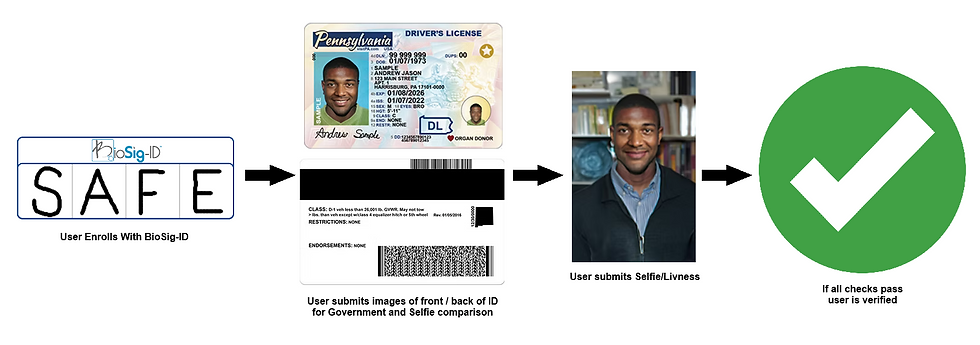
How BioProof-ID Works Inside Canvas
Bio-Proof-ID configuration within Canvas can be tailored to align with institution-specific processes. Integration at the admissions level is advised, as it prevents ghost students from taking seats. The most effective placement is often within a central onboarding course where BioSig-ID enrollment is a requirement, however, it can also be added directly to regular courses. Canvas conditional requirements make it easy to block students from further access until identity verification is complete.
The Middle - Detecting and preventing cheating attempts throughout the course
Academic dishonesty has surged in virtual classrooms with reports of up to 70% cheating. Students have easy access to contract cheating services, can share login credentials in seconds, and even enlist friends or family to complete coursework. These tactics make it simple for someone other than the enrolled student to participate in attendance, assignments, or discussions.
The Solution: Continuous Identity Authentication with BioSig-ID
BioSig-ID goes beyond one-time verification. Institutions require authentication at multiple points throughout the course—before accessing modules, submitting assignments, or taking quizzes. This continuous approach ensures the person completing the work is the same individual who enrolled, effectively blocking impersonation and contract cheating.
A BioSig-ID password is extremely difficult to share because it relies on unique behavioral patterns that are virtually impossible for imposters to reproduce. These include line length, writing speed, stroke count, angles, order, and other distinctive characteristics specific to each individual.
Unlike traditional passwords, BioSig-ID uses gesture biometrics. Students draw a password using a mouse, finger, or stylus, creating a unique pattern based on speed, angle, and stroke length. Even if someone sees an image of the password, they cannot replicate the exact motion characteristics. Independent testing by the Tolly Group and NIST (opens in a new tab) confirms BioSig-ID’s accuracy, achieving a 99.97% impostor-prevention rate.
Interesting note: A survey of first-time users discovered that 48% found creating the BioSig-ID written password was “Entertaining”. Since 2014, BSI has had an open contest on our web page where anyone can try to duplicate the written pattern of the password “MoM” to win $500.00. To date, over 44,000 attempts from multiple countries have attempted to crack the password – no one has won the money!
How BioSig-ID Works Inside Canvas
BioSig-ID integrates seamlessly with Canvas LMS via the BioSig-ID Admin App, providing institutions with flexible options for identity verification. Instructors can configure BioSig-ID as a tool instance, where students authenticate once to unlock a course item, or as a quiz intercept, requiring verification every time they access an exam. Both options are simple to implement inside Canvas, ensuring continuous identity protection without disrupting the learning experience.
Example Image: BioSig-ID instance in Canvas

The End – Ensuring End-of-Course Exam Integrity
High-stakes exams are the last checkpoint in the learning journey—and are often the most vulnerable. Students under pressure may turn to contract cheaters or AI-assisted tools to gain an edge, while shared credentials and impersonation remain persistent threats.
The Solution: BioSig-ID and BioSight-ID
Guarded Quizzes with BioSig-ID
Instructors can use the BioSig-ID Admin App in Canvas to require authentication before students access quizzes or exams. This ensures only the verified student can begin the assessment, reducing impersonation and credential sharing.
BioSight-ID and BioSightPlus-ID
For enhanced security, BioSight-ID offers privacy-conscious proctoring by blurring and muting recordings. This is possible because the user has already validated their identity through BioSig-ID, confirming their presence. Unlike traditional systems that rely on intrusive webcam monitoring, BioSight-ID leverages AI-driven behavior analysis to detect suspicious activity—without compromising student privacy.
BioSightPlus-ID takes this functionality a step further with clear, unblurred, and unmuted monitoring, along with advanced features designed to ensure compliance during high-stakes exams—without creating a stressful testing environment. These features include room scanning, screen recording, and guided steps to check for unauthorized devices or materials before the exam begins.
How BioSight-ID & BioSightPlus-ID Work Inside Canvas
The BioSight-ID and BioSightPlus-ID dashboard inside Canvas make proctoring simple and instructor-friendly. Instead of juggling external tools, instructors can monitor exams directly within Canvas. The dashboard provides real-time alerts, AI-driven behavior analysis, and easy access for session review without leaving Canvas. This streamlined approach ensures secure, privacy-conscious proctoring while keeping the workflow intuitive for faculty.
Example Image: BioSight-ID dashboard
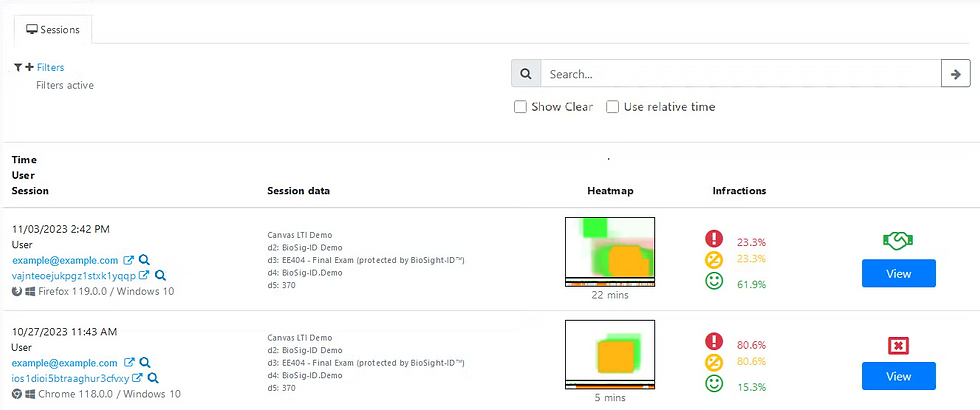
Example Image: BioSight-ID session with two users detected

Understanding the Technical Details: A Closer Look at the BioSig + Canvas LMS Integration
BioSig-ID integrates seamlessly with Canvas LMS through Learning Tools Interoperability (LTI), making it simple for institutions to add identity verification without disrupting the learning experience.
Here’s how:
Canvas Installation Guide: https://setup.biosig-id.com/portal/en/kb/articles/canvas-installation-guide (opens in a new tab)
Module Requirements
Canvas supports conditional content release. By setting BioSig-ID as a prerequisite, instructors can require students to authenticate before unlocking modules or assignments. These checkpoints reinforce continuous identity verification throughout the course, thus blocking access sharing.
Smart Start Attendance Verification
Many institutions use BioSig-ID during the first few weeks of classes to confirm attendance and identity. This early step helps prevent fraud rings from enrolling fake students and claiming financial aid.
Best Practices for Canvas Integration
Authenticate at Enrollment: Use BioSig-ID during registration or orientation to establish a secure baseline.
Add Checkpoints: Require authentication before major assessments, high-stakes activities, or whenever there is a gradable course item.
Utilize a secure browser: Pair BioSight-ID or BioSightPlus-ID with Safe Exam Browser for complete exam security. Preventing unauthorized AI applications or websites during exams.
Monitor Analytics: Leverage BioSig-ID’s forensic reporting to detect suspicious patterns.
Forensic Analytics
BioSig-ID’s reporting tools provide deep insights into user behavior, helping institutions detect anomalies such as:
Unusual jumps in location
Different OS and browser
Unusual inactivity patterns
Multiple logins from the same IP address
Shared time frames for completing course items
Similarity in the way two or more BioSig-ID password patterns were created
Example Image: Custom Detail Report

Example Image: Custom Detail Report showing IP conflict

These analytics enable schools to proactively address cheating and fraud, protecting both academic integrity and federal funds.
Proven Performance:
Over+235 customers
+110M Authentications
+2M Users in 154 countries
Used in millions of courses
Used by higher ed, defense, real estate, and financial services
Ease of Use:
Over 950,000 Users
Completed over 30M student launches / ID authentications
Only 0.045% submitted a help desk ticket
Focusing on Security to Stay Future Ready
Cheating and fraud in online education have exploded—impacting every stage of the learning journey. From FSA fraud rings to mid-course impersonation and AI-assisted exam cheating, the threats are real and growing. Institutions can no longer rely on passwords or basic LMS security to protect integrity.
BioSig-ID delivers a complete solution. Its gesture biometric technology provides continuous identity verification within seconds. Paired with BioProof-ID for secure enrollment and BioSight-ID/BioSightPlus-ID for remote proctoring, BioSig-ID creates a layered defense that stops FSA fraud and cheating—while preserving the student experience.
Ready to protect your Canvas environment? Learn how BioSig-ID can help your institution fight fraud and uphold integrity throughout the entire learning journey."
Jeff Maynard
BSI CEO
January, 2026
Read the Blog on its original page:


Comments